
mikecargal
Apple Game Frameworks and Technologies: Chapter 5 question
Title: Name of book: Apple Game Frameworks and Technologies (Chapter 5 “die” animation)
Not an errata that I can tell so far…
I’m at the point in Chapter 5 of changing to the “die” animation on gameOver().
For some reason, the display does not change to the “die” png.
I’ve placed print() debugging statements in the player::die() method
    func die() {
        print("Player::die()")
        guard let dieTextures = dieTextures else {
            preconditionFailure("Could not find die textures!")
        }
        print("removeAction(forKey: \"walk\"")
        removeAction(forKey: "walk")

        print("dieTextures=>>\(dieTextures)<<")
        print("startAnimation(name:\"die\"")

        startAnimation(textures: dieTextures, speed: 0.25,
                       name: "die",
                       count: 0, resize: true, restore: true)
    }
and I get the following in the debug console:
player hit collectible
player hit collectible
collectible hit foreground
Player::die()
removeAction(forKey: "walk"
dieTextures=>>[<SKTexture> 'blob-die_0' (186 x 196)]<<
startAnimation(name:"die"
So, I know:
- the die() method is being called.
- the dieTextures has a single entry named “blob-die_0” (dimensions 186x196 on iPhone 8 simulator (and I see the 3x dimensions if I run on another simulator), so it really seems like it’s finding the png assets. (I followed the link in the assets, and it opened a directory that has the “sad blob” images.)
But this is what the screen looks like (you can even see the rectangle missing from removing the physics attributes from the drop
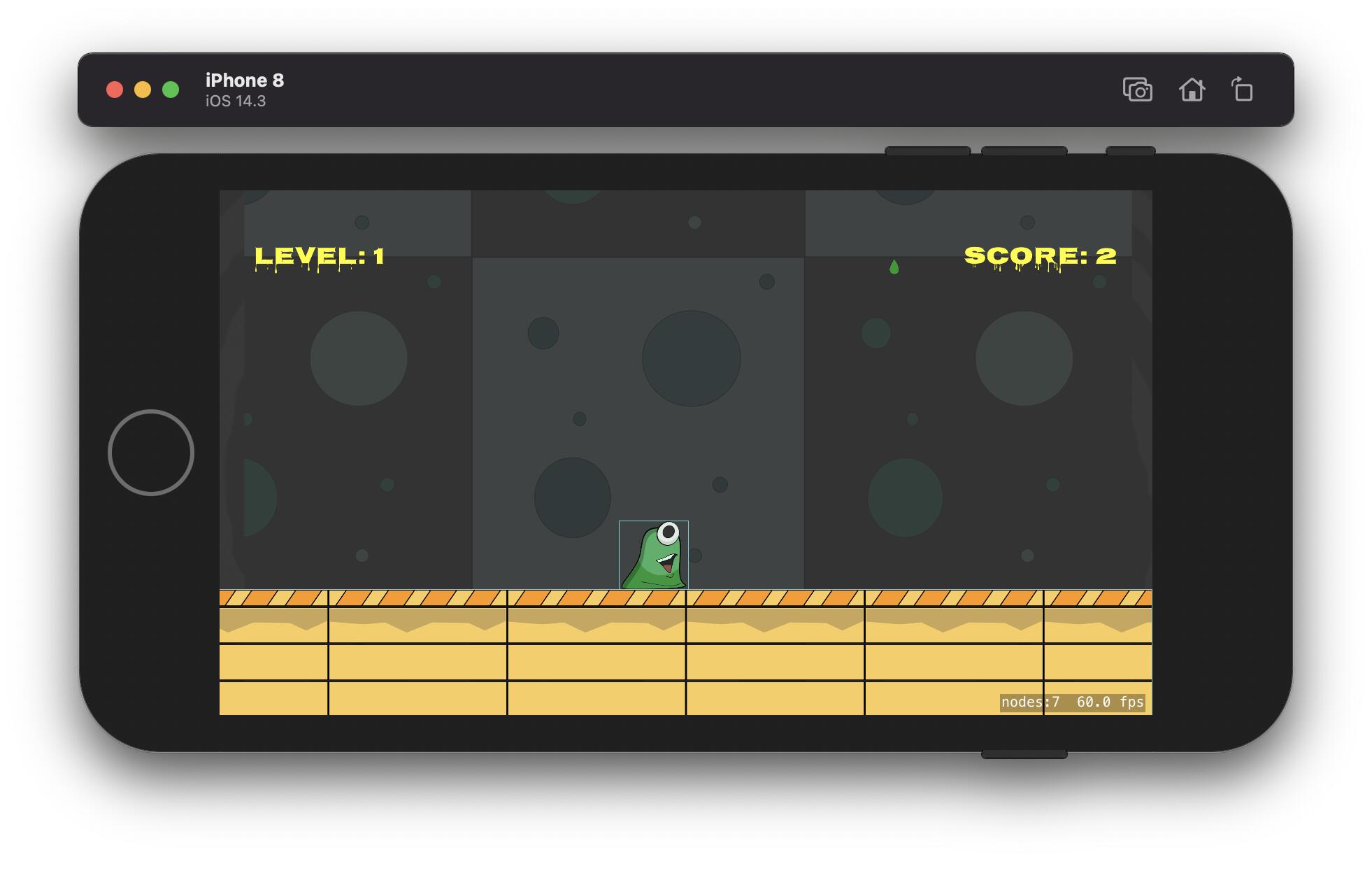
I’ve thought about comparing to the “end” project but there’s a lot of stuff left in the chapter before I get to the “end” state (so not applicable to current state). (I did start from my own previous project state (not the “start” project file. I may re-work my way through chapter 5 to this point on that project . But, I generally find that I learn a lot be trying to debug whatever I did wrong. In this case I’ve read, re-read, re-compared the steps in chapter 5 until I’m cross-eyed. (The changes for the labels, and everything up to this are all “working”)
So, as a question… does anyone have a suggestion as to where I should look. (I’m in that debugging state, where there’s so little involved in the changes, that I can’t see what I may have missed). Hoping someone has been here and can point me in the right direction.
Oh yeah… feel free to tell me “you’re on your own. Your mess, you clean it up” 
Marked As Solved
mikecargal
Mystery solved…
It was “Code Completion” in the SpriteKitHelper::startAnimation(...) { ... SKAction.animate(...) ...} with a withNormalTextures: instead of with:
(How the detective missed that so many times, remains a mystery. He’s on desk duty pending an investigation into his competency.)
Also Liked
mikecargal
I am enjoying the book. I wasn’t really expecting anyone to find my typo for me. (In hindsight, probably biggest “surprise” was that the mistake was something I got wrong so far back and didn’t bit me until this part.
And, based on your endorsement, the detective is back “on the beat”
mikecargal
Here’s a probably hint if anyone is interesting in tossing me a hint.
I went ahead with the code to override the update(_ currentTime: TimeInterval) method, and I do indeed see the level going wild, but I’m not bombarded with gloop drops. (I’m pretty sure that points to what I missed before, but I need to call it a day)
If I find it tomorrow, I’ll update.

Paradox927
Hey, Mike.
Sorry for the delay in getting back to you. Usually, I’m a lot faster at responding to these posts, but this week has proven to be quite the challenge. It seems time was not on my side. 
On the plus side, it looks like you got everything working—and, for what it’s worth, I think you should keep that detective on the payroll. Everyone deserves a second chance. 

Have a great weekend. Hope you’re enjoying the book.
Popular Pragmatic Bookshelf topics









Other popular topics








Categories:
Sub Categories:
Popular Portals
- /elixir
- /rust
- /wasm
- /ruby
- /erlang
- /phoenix
- /keyboards
- /python
- /js
- /rails
- /security
- /go
- /swift
- /vim
- /java
- /clojure
- /typescript
- /emacs
- /haskell
- /svelte
- /onivim
- /kotlin
- /react
- /c-plus-plus
- /crystal
- /tailwind
- /gleam
- /ocaml
- /elm
- /vscode
- /flutter
- /html
- /deepseek
- /ash
- /zig
- /opensuse
- /php
- /centos
- /react-native
- /scala
- /lisp
- /textmate
- /sublime-text
- /nixos
- /debian
- /agda
- /deno
- /django
- /nodejs
- /kubuntu
- /arch-linux
- /ubuntu
- /spring
- /revery
- /manjaro
- /julia
- /quarkus
- /lua
- /diversity
- /laravel
Devtalk Sponsors

Practical resources that improve the lives of professional developers.

We build trusted fault-tolerant systems that scale to billions of users.

Real-time error tracking, performance insights, and observability for devs.

Supporting innovation across the BEAM ecosystem.

We build reliable cloud platforms for business-critical systems.

Develop your skills with books, videos, and courses.

Catch errors, track performance, monitor hosts and more.

Enabling companies to succeed by building software people love.

Courses that move you from confusion to "Aha, now I get it!"

Publishing Linux Magazine, ADMIN, and MakerSpace for 25+ years.