
AstonJ
Psql: error: connection to server on socket "/tmp/.s.PGSQL.5432" failed: No such file or directory
If you’re getting errors like this:
psql: error: connection to server on socket “/tmp/.s.PGSQL.5432” failed: No such file or directory
See post below!
Marked As Solved
AstonJ
If you’ve tried the usual of:
$ brew services stop postgresql
$ rm /usr/local/var/postgres/postmaster.pid
$ brew services start postgresql # Or: brew services restart postgresql
…and banged your head a lot, you may find it’s your Mac! Go to:
System Settings > General > Login Items and Extensions > Allow in the Background
To check if you have postgres listed and that it is on!
And if your system is a bit messed up (like mine, thank you Apple!) you may even have TWO!!! BOTH of these must be ON!!
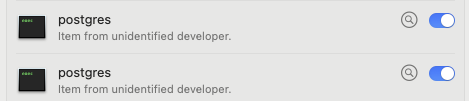
Hope this helps someone! 
Popular Backend topics






Other popular topics



Sponsor Spotlight

Courses that move you from confusion to "Aha, now I get it!"
Latest in Ruby on Rails
Latest in PostgreSQL
Backend>Questions

Categories:
Sub Categories:
Popular Portals
- /elixir
- /rust
- /wasm
- /ruby
- /erlang
- /phoenix
- /keyboards
- /python
- /js
- /rails
- /security
- /go
- /swift
- /vim
- /java
- /clojure
- /typescript
- /emacs
- /haskell
- /svelte
- /onivim
- /kotlin
- /react
- /c-plus-plus
- /crystal
- /tailwind
- /gleam
- /ocaml
- /elm
- /vscode
- /flutter
- /html
- /ash
- /deepseek
- /zig
- /opensuse
- /centos
- /php
- /react-native
- /scala
- /lisp
- /sublime-text
- /textmate
- /nixos
- /debian
- /agda
- /deno
- /django
- /nodejs
- /kubuntu
- /arch-linux
- /ubuntu
- /spring
- /revery
- /manjaro
- /julia
- /lua
- /quarkus
- /diversity
- /laravel
Devtalk Sponsors

Practical resources that improve the lives of professional developers.

We build trusted fault-tolerant systems that scale to billions of users.

Real-time error tracking, performance insights, and observability for devs.

Supporting innovation across the BEAM ecosystem.

We build reliable cloud platforms for business-critical systems.

Develop your skills with books, videos, and courses.

Catch errors, track performance, monitor hosts and more.

Enabling companies to succeed by building software people love.
Courses that move you from confusion to "Aha, now I get it!"

Publishing Linux Magazine, ADMIN, and MakerSpace for 25+ years.