
Keton
Hands-on Rust: How do I debug a call chain in Rust?
When running the program in chapter 8, “Implementing Combat”, the printout Health before attack was never printed so I assumed something was wrong in the call chain.
How would I go about debugging this call chain (ecs.entry_mut(*victim).unwrap()...)?
#[system]
#[read_component(WantsToAttack)]
#[read_component(Health)]
pub fn combat(ecs: &mut SubWorld, commands: &mut CommandBuffer) {
    ...
    victims.iter().for_each(|(message, victim)| {
        if let Ok(mut health) = ecs
            .entry_mut(*victim)
            .unwrap()
            .get_component_mut::<Health>()
        {
            println!("Health before attack: {}", health.current);
            ...
        }
        commands.remove(*message);
    });
}
After some comparing of source code, I found out that I had actually written read_component(Health) instead of write_component(Health).
#[system]
#[read_component(WantsToAttack)]
#[write_component(Health)]
pub fn combat(ecs: &mut SubWorld, commands: &mut CommandBuffer) {
    ...
}
This is my first encounter with Rust but I was surprised that this error slipped by the compiler. I expected similar error as if I hade left out some mut…
Most Liked

Red
I don’t own this book so I cannot comment on the code, but here are a few tricks I use to debug chained methods and see the intermediate values. I’m using the IntelliJ plugin.
To just see the types at different point, the same techniques can be used - check values in a map, or split the chained method into several intermediate variables.
To take a dummy example:
    let values = vec!["one", "two", "three"];
    let values_str = values.iter()
        .enumerate()
        .map(|(i,s)| {
            format!("{}: {}", i + 1, s)      // <== breakpoint here
        })
        .collect::<Vec<_>>()
        .join(", ");                         // <== breakpoint here
    println!("Result: {}", values_str);
It’s possible to place a breakpoint on the map closure. Make sure to use a block with ‘{ … }’ and that the code is not on the same line. Otherwise, values are not visible:
.map(|(i,s)| { format!("{}: {}", i + 1, s) }) // <== I cannot see anything
It’s also possible to put breakpoints on the lines after, but on the lines before it’s a bit tricky because it’s an iteration and there is no closure to expose any value. The debugger will stop but will not show anything. Sometimes you may be able to step into the function and catch something from there, but it’s tedious.
One way to look is to insert a dummy identity map. For example if I want to catch the values before the enumerate:
    let values_str = values.iter()
        .map(|x| {
            x                   // <== breakpoint here
        })
        .enumerate()
        .map(|(i,s)| { format!("{}: {}", i + 1, s) })
        .collect::<Vec<_>>()
        .join(", ");
You can even put a println!(), that’s usually easier than looking at the values in the debugger.
Another way is to simply split the calls and store the intermediate result in temporary variables. Note the clone() to avoid losing ownership on the intermediate data:
    let values = vec!["one", "two", "three"];
    let values_str_1 = values.iter()
        .enumerate();
    let debug = values_str_1.clone().collect::<Vec<_>>();
    let values_str = values_str_1                         // <== breakpoint
        .map(|(i,s)| { format!("{}: {}", i + 1, s) })
        .collect::<Vec<_>>()
        .join(", ");
    println!("Result: {}", values_str);
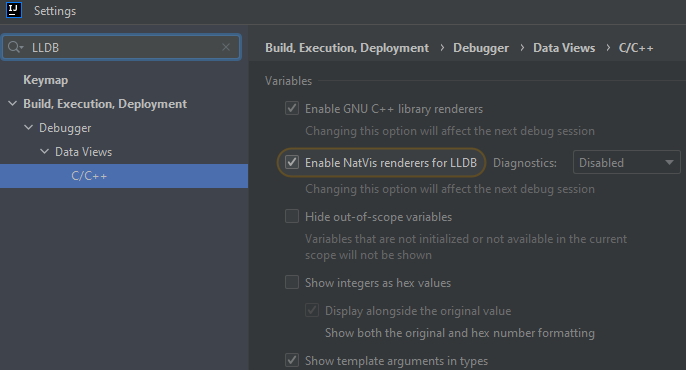
PS: I found out that with that plugin, you had disable the NatVis renderers if you examine the values in the LLDB view, otherwise you get a lot of warnings hindering the view:

herbert
Hi,
Thanks for reading the book!
Unfortunately, Legion (the ECS) is responsible for the World access (which is what the read_component is handling) - and doesn’t flag that one at compile time. I really wish it did!
The issue can be caught by changing the if let. if let is like a single-case match, so it’s only running the enclosed code if get_component_mut succeeds - and continues on its way if it fails.
get_component_mut returns a Result type. So you have a few options for handling this:
The simplest way, not very specific:
if let Ok(mut health) = ecs.entry_mut(*victim).unwrap().get_component_mut::<Health>() {
} else {
     // Print an error here
}
Using match:
match ecs.entry_mut(*victim).unwrap().get_component_mut::<Health>() {
    Ok(mut health) => { // do the health deduction }
    Err(msg) => { // Handle the error, msg will tell you what went wrong }
}
Or you can choose to crash when things go wrong (surprisingly helpful for debugging):
let mut victim = ecs.entry_mut(*victim).unwrap().get_component_mut::<Health>().unwrap();
// Health deduction code
Hope that helps!
Popular Pragmatic Bookshelf topics








Other popular topics





Categories:
Sub Categories:
Popular Portals
- /elixir
- /rust
- /wasm
- /ruby
- /erlang
- /phoenix
- /keyboards
- /python
- /js
- /rails
- /security
- /go
- /swift
- /vim
- /java
- /clojure
- /typescript
- /emacs
- /haskell
- /svelte
- /onivim
- /kotlin
- /react
- /c-plus-plus
- /crystal
- /tailwind
- /gleam
- /ocaml
- /elm
- /vscode
- /flutter
- /html
- /ash
- /deepseek
- /zig
- /opensuse
- /php
- /centos
- /react-native
- /scala
- /lisp
- /sublime-text
- /textmate
- /nixos
- /debian
- /deno
- /agda
- /django
- /nodejs
- /kubuntu
- /arch-linux
- /ubuntu
- /spring
- /revery
- /manjaro
- /julia
- /lua
- /diversity
- /quarkus
- /laravel
Devtalk Sponsors

Practical resources that improve the lives of professional developers.

We build trusted fault-tolerant systems that scale to billions of users.

Real-time error tracking, performance insights, and observability for devs.

Supporting innovation across the BEAM ecosystem.

We build reliable cloud platforms for business-critical systems.

Develop your skills with books, videos, and courses.

Catch errors, track performance, monitor hosts and more.

Enabling companies to succeed by building software people love.

Courses that move you from confusion to "Aha, now I get it!"

Publishing Linux Magazine, ADMIN, and MakerSpace for 25+ years.