
MartinDelophy
Timeline Studio - I’m building an open-source, local-first AI video editor that runs in the browser
Hi everyone,
I’ve been building Timeline Studio, an open-source video editor that runs directly in a modern browser. It combines a multi-track timeline with browser-local AI features, rather than treating AI as a separate “upload a file and wait for a result” service.
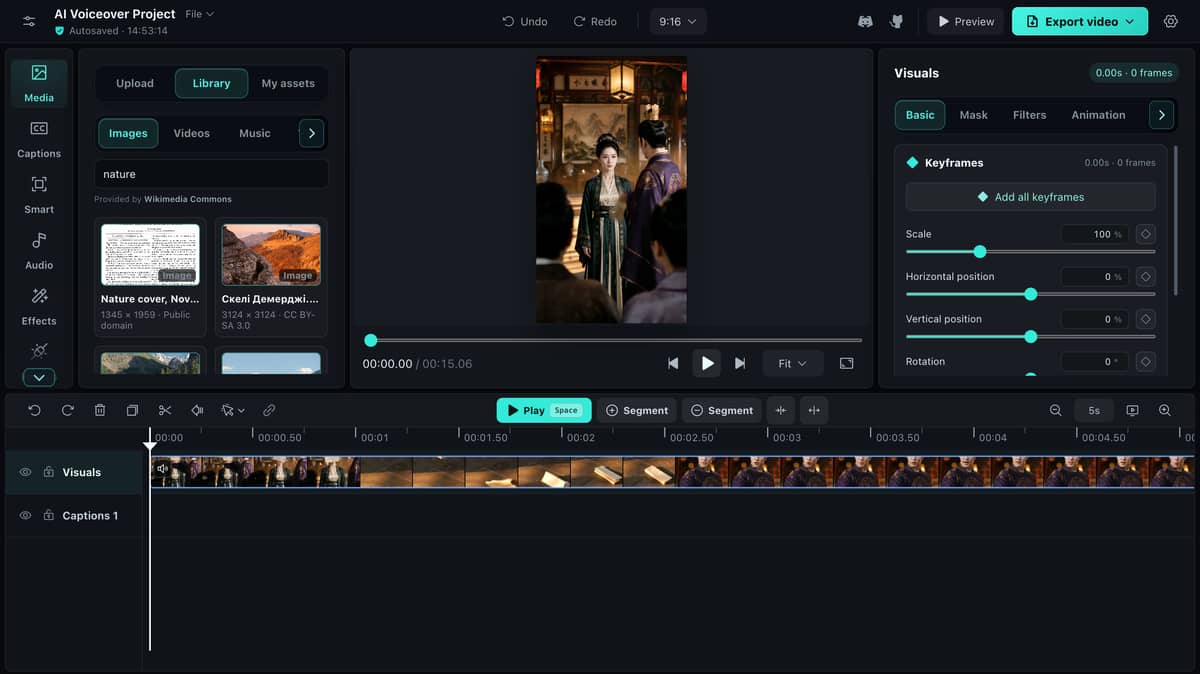
The basic idea is simple: for supported workflows, project media and inference should stay on the user’s device. The difficult part was making that idea behave like an editor rather than a collection of AI demos.
What it currently does
Timeline Studio has a CapCut-style multi-track workspace with a contiguous main visual track, picture-in-picture overlays, captions, stickers, voiceovers, source audio, and music.
Clips remain editable: they can be moved, split, trimmed, duplicated, transformed, masked, filtered, animated, speed-adjusted, and keyframed.
The browser-local AI workflows include:
- Multilingual voiceovers
- Whisper-based automatic captions
- WebGPU AI music generation
- Subject detection, portrait matting, and smart framing
- Object and watermark repair and video denoising
- Vocal separation
- Talking-portrait generation
Generated or processed media goes back into the editable project instead of becoming an opaque final result. Projects can be saved as portable .timeline files, and the editor has a separate deterministic export path for producing video.
Why build this in the browser?
I wanted to explore whether a serious creative workflow could be local-first without requiring users to install a large desktop editor or upload every source clip to an editing backend.
The browser now provides many of the required pieces:
- WebGPU and ONNX Runtime Web for selected model inference
- Web Workers to keep model execution, decoding, and export away from the UI thread
- WebCodecs and native media APIs for frame-accurate media processing
- Cache Storage and service workers for revision-pinned model delivery
- IndexedDB and portable project files for persistent local editing state
But using these APIs together exposed a different class of problems. Browser AI is not just about loading a model. It is also about memory lifetime, execution-provider differences, media timestamps, caching, progress reporting, cancellation, and keeping preview and export consistent.
Three engineering problems that took more work than expected
1. A video timeline must respect source timestamps
Generating a strip of video thumbnails sounds easy until a clip contains variable frame timing or a hard cut. Sampling the nearest decoded frame can reveal the next shot before the playhead reaches the real cut.
The editor keeps the ordinary filmstrip readable while replacing the cell beneath the playhead with the exact source presentation-timestamp frame.
Long videos publish a bounded seed set first, then refine visible cells before continuing through offscreen cells in the background. Scrubbing temporarily pauses that refinement so pointer movement remains responsive.
2. Preview and export are two rendering systems
A responsive editor preview can use native media playback, but deterministic export has to reconstruct the composition frame by frame.
Crop geometry, masks, captions, overlays, effects, speed curves, and audio timing must agree between both paths.
The project therefore treats the editable timeline as the source of truth. Export uses a separate offline renderer, with native browser encoding where possible and compatibility fallbacks when codec support differs.
3. Local-first model delivery still has real costs
Keeping inference local avoids uploading project media for supported operations, but it moves the cost to first-run downloads, device storage, GPU and CPU capability, and memory pressure.
Models are lazy-loaded, pinned to immutable revisions, cached by a shared service worker, and mirrored across Hugging Face and ModelScope.
The UI reports actual setup progress and keeps initialized workers alive for repeated runs. A local-first product still needs honest failure states; it should not pretend every device can run every model equally well.
Making the timeline usable mattered as much as the AI
A surprising amount of development time went into interaction details rather than inference:
- Keeping the main visual track magnetically gapless
- Supporting rolling boundaries and explicit ripple editing
- Preserving wheel-gesture semantics while the timeline scrolls beneath the pointer
- Keeping linked captions and voiceovers aligned without forcing them to remain linked forever
- Preventing overlapping audio clips from unexpectedly moving to another lane
- Making progressive thumbnail preparation coexist with real-time scrubbing
- Keeping desktop and touch workflows usable in 11 interface languages
These details are less impressive in a model demo, but they determine whether the result feels like a tool people can actually edit with.
An agent can edit the project without reducing it to a rendered video
The repository also includes a Timeline Studio Skill and a versioned command runner for coding agents.
An agent can inspect a portable project, produce a semantic diff, apply supported edits transactionally, and write a new .timeline artifact instead of overwriting the input.
That direction is important to me: an AI agent should make reversible edits with stable clip IDs and explicit timestamps, while the human keeps an editable project and can inspect what changed.
Current limitations
This is still an evolving project, not a claim that the browser has replaced every desktop NLE.
- The heaviest AI workflows require a modern Chromium browser and benefit significantly from WebGPU.
- First use can involve large model downloads; later runs reuse the browser cache.
- Performance and codec support vary by device and browser.
- Some integrations use remote providers and are clearly presented as connectors rather than local inference.
- Third-party model weights have their own licenses even though the original application code is MIT-licensed.
I’d value developer feedback
I’m especially interested in feedback from people working with WebGPU, WebCodecs, ONNX Runtime Web, browser media pipelines, or timeline editors.
If you try it, I’d love to know:
- Which local-first workflow is most useful to you: captions, voice, repair, music, or something else?
- Where should a browser editor draw the line between local inference and remote providers?
- Which device and browser combination did you use, and where did performance or compatibility break down?
Thanks for taking a look. Bug reports, focused contributions, and architecture discussions are all welcome.
- GitHub: GitHub - MartinDelophy/ai-video-editor: Open-source, local-first video editor where creators and AI agents edit the same real timeline. · GitHub
- Live demo: https://video-editor.ai-creator.top/
- License: MIT for the original source code; third-party models retain their own licenses
Popular Frontend topics







Other popular topics


Sponsor Spotlight

We build trusted fault-tolerant systems that scale to billions of users.

Categories:
Sub Categories:
Popular Portals
- /elixir
- /rust
- /wasm
- /ruby
- /erlang
- /phoenix
- /keyboards
- /python
- /js
- /rails
- /security
- /go
- /swift
- /vim
- /java
- /clojure
- /typescript
- /emacs
- /haskell
- /svelte
- /onivim
- /kotlin
- /react
- /c-plus-plus
- /crystal
- /tailwind
- /gleam
- /ocaml
- /elm
- /vscode
- /flutter
- /html
- /ash
- /deepseek
- /zig
- /opensuse
- /php
- /centos
- /react-native
- /scala
- /lisp
- /sublime-text
- /textmate
- /nixos
- /debian
- /deno
- /agda
- /django
- /nodejs
- /kubuntu
- /arch-linux
- /ubuntu
- /spring
- /revery
- /manjaro
- /julia
- /diversity
- /quarkus
- /lua
- /laravel
Devtalk Sponsors

Practical resources that improve the lives of professional developers.
We build trusted fault-tolerant systems that scale to billions of users.

Real-time error tracking, performance insights, and observability for devs.

Supporting innovation across the BEAM ecosystem.

We build reliable cloud platforms for business-critical systems.

Develop your skills with books, videos, and courses.

Catch errors, track performance, monitor hosts and more.

Enabling companies to succeed by building software people love.

Courses that move you from confusion to "Aha, now I get it!"

Publishing Linux Magazine, ADMIN, and MakerSpace for 25+ years.